
• Home
  • NewTech
  • A.I
  • Crypto
  • Reviews
    • Apps Review
    • Game Review
    • Hardware Review
    • Laptop Review
    • Mobile Review
    • Software Review
    • Website Review
  • Money
  • Security
  • More
    • TechReport
    • Automobile
    • Tips & Tricks
    • Android
    • iPhone
    • Window 7
    • Windows 8
    • Software
    • Tech Movies
    • Tutorials
      • Web Design
      • SEO
  • Home
  • Tech Store
  • About US
  • Write for Us
  • Privacy Policy
  • Contact Us

Subscribe to Updates

Get the latest creative news from FooBar about art, design and business.

Facebook Twitter YouTube
Trending
  • 5 Game‑Changing Tech Trends To Watch In 2026
  • How to Watch Free Movies and TV Shows on Google TV (No Subscription Required)
  • DeepSeek AI: Why is it the New Trend in Artificial Intelligence?
  • Web3 in 2025: Unlocking New Possibilities for a Decentralized Future
  • In-Depth Review of the OnePlus 13R: The Smarter Ever Flagship Smartphone
  • Groundbreaking Technology and Gadgets Unveiled at CES 2025
  • Quantum Computing Applications: Real-World Use Cases Emerging in 2025
  • Fortune 500 to Crypto: How Major Corporations Are Integrating Digital Assets in 2025
  • 10 Essential AI Tools for Personal Growth
  • India Push For Quantum Computing Current & Future Prospects
Tuesday, 17 November 2026
Facebook Twitter YouTube
TechFriend.IN
  • Home
  • NewTech

    5 Game‑Changing Tech Trends To Watch In 2026

    November 27, 2025

    Web3 in 2025: Unlocking New Possibilities for a Decentralized Future

    January 21, 2025

    Quantum Computing Applications: Real-World Use Cases Emerging in 2025

    January 10, 2025

    Technological Advances in Future Digital Cameras

    July 20, 2020

    The New Technologies We Can See in 2020

    April 19, 2020
  • A.I
  • Crypto
  • Reviews
    1. Apps Review
    2. Game Review
    3. Hardware Review
    4. Laptop Review
    5. Mobile Review
    6. Software Review
    7. Website Review
    Featured

    In-Depth Review of the OnePlus 13R: The Smarter Ever Flagship Smartphone

    8.5 January 19, 20251K Views6 Mins Read
    Recent
    8.5

    In-Depth Review of the OnePlus 13R: The Smarter Ever Flagship Smartphone

    January 19, 2025

    Dynamics 365 F&O Implementation in Regulated Industries

    August 4, 2023

    Top VR Headsets for Private Entertainment

    May 13, 2023
  • Money

    How to be a freelancer? a complete freelancing Guide!

    October 20, 2022

    How can you earn money on Metaverse? 5 ways to earn money

    April 7, 2022

    Want To Play Ludo For Real Money? Here’s Your Guide To Getting Started

    December 16, 2020

    Making money with video: a simple and neat chance to earn well

    August 6, 2015
  • Security
  • More
    • TechReport
    • Automobile
    • Tips & Tricks
    • Android
    • iPhone
    • Window 7
    • Windows 8
    • Software
    • Tech Movies
    • Tutorials
      • Web Design
      • SEO
TechShop
TechFriend.IN

Set a greeting message on windows 7 that appears before the desktop

May 1, 2013Updated:May 1, 2013No Comments1 Min Read
Facebook Twitter Pinterest LinkedIn Tumblr Email WhatsApp Reddit
Share
Facebook Twitter LinkedIn Pinterest Email Tumblr Reddit Telegram WhatsApp

Would you like to display a message before the desktop appears every time you boot?

Set a greeting message on windows 7 that appears before the desktop, You can do this in almost no time with a small change in the registry.

Click on “Start” and enter the term “regedit” under “Search programs/files”. Windows presents the search result directly in the Start menu.

Under “Programs”, click on “regedit.exe” with the right button of the mouse. In the context menu, select “Run as administrator”. If required, authorise this instruction by selecting a user account with administrator rights and entering the required password. After that, in the left pane of the registry editor, navigate to the key “HKEY_LOCAL_MACHINE\SOFTWARE\Microsoft\Windows\CurrentVersion\Policies\System”.
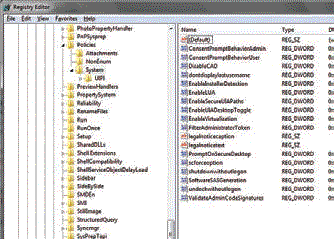
how to Set a greeting message that appears before the desktop

SmartHomeShop

 Now, you will see the character strings “legalnoticecaption” and “legalnoticetext” in the right section. Using “legalnoticecaption”, define a title for your message, and enter the actual message text under “legalnoticetext”. After that, double click on the value names and enter your details under “Value” in the following dialogue “Edit string”. Finally, close the registry editor and restart your PC for the settings to take effect.

So share any enjoy with Friends……….

Earn.Directory
edit welcome message in windows 7 greeting message in windows 7 widows 7 tips windows 7 tricks
Share. Facebook Twitter Pinterest LinkedIn Tumblr Email Reddit WhatsApp

Related Posts

How to Watch Free Movies and TV Shows on Google TV (No Subscription Required)

February 11, 2025 Tips & Tricks

Tips to Recharge Airtel Prepaid plans with Discount and Cashback

January 20, 2023 Tips & Tricks

How to make your home a smart home in India? Full guide!

October 23, 2022 Tips & Tricks
Shopping Offers


Categories
  • Artificial Intelligence (8)
  • Automobile (4)
  • Cryptocurrency (4)
  • Earn Money Online (4)
  • Metaverse (1)
  • Mobile (19)
  • New Technology (19)
  • Security (17)
  • Tech Interview (1)
  • Tech Report (34)
  • Tech Review (53)
  • Tips & Tricks (26)
  • Tutorials (6)
  • Web Design (8)
Stay In Touch
  • Facebook96.5K
  • YouTube35.8K
  • Twitter15K
  • Instagram
Latest Reviews
Mobile Review

In-Depth Review of the OnePlus 13R: The Smarter Ever Flagship Smartphone

8.5 January 19, 20251K Views6 Mins Read
Software Review

Dynamics 365 F&O Implementation in Regulated Industries

August 4, 2023899 Views4 Mins Read
VR and AR

Top VR Headsets for Private Entertainment

May 13, 20231K Views7 Mins Read

Subscribe to Updates

Get the latest tech news from FooBar about tech, design and biz.

About
About

Techfriend.IN is a technology blog website that focuses on providing news and information about the latest developments in the field of technology. It covers a wide range of topics including software, hardware, internet, crypto, mobile devices, and more. The blog aims to provide its readers with in-depth analysis and opinions on the latest trends and innovations in the tech world. It also serves as a resource for those looking to stay up-to-date on the latest technologies and their applications.

Facebook Twitter RSS
Most Popular

Should You Invest in Cryptocurrency In 2022? – The Future is Here

April 3, 20223K Views

10 Essential AI Tools for Personal Growth

June 18, 20243K Views

Guide – To Restore Deleted Images in Windows 10, 11

December 9, 20213K Views

Subscribe to Updates

Get the latest creative news from FooBar about art, design and business.

© 2026 TechFriend.IN | All Rights Reserved!
  • Home
  • Tech Store
  • About US
  • Write for Us
  • Privacy Policy
  • Contact Us

Type above and press Enter to search. Press Esc to cancel.